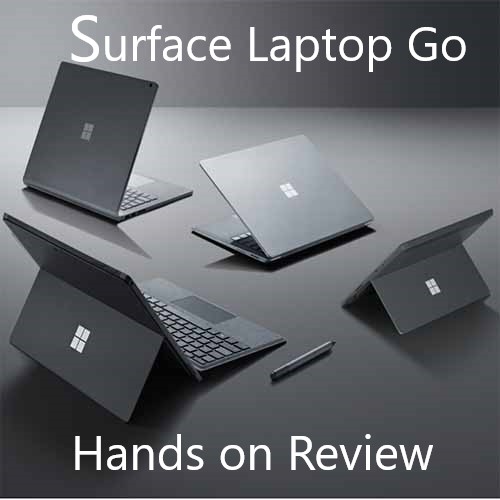

Introduction
Anyone that reads my blogs/ramblings will know I’m a huge fan of Windows 10 and Surface and I have reviewed a fair few of them over the past 18 months.
Microsoft’s Surface Laptop Go is a more than capable, great looking, and best of all “affordable” premium laptop from Microsoft that is every bit “Surface”..well almost!
Surface Laptop Go starts at just £549 in the UK (as of Nov 2020) and it’s not often that you can find a “premium device” at this price point that isn’t plasticy, chunky, heavy, and slow (often with several generation old processors) – which is the typical trend around this price point – after all you get what you pay for right!
Here’s my hands on review.
Hands-on Review
What I find funny about Surface is that many analysts/reviewers (I won’t name names) often slate Surface for being an overpriced device when compared to, well, cheaper, non-premium device, but then again Surface is a premium brand, and, like Apple and premium does carry a price tag. What I think everyone who has ever had a Surface (from Surface Pro 4 and upwards) will agree, is that Microsoft do make some pretty awesome, good-looking, powerful and extremely productive devices with ink and touch and the centre of the Surface and Microsoft 365 message…. (more on that later).
If you’ve not experienced Surface before, then I truly think you are missing out.. Its like having a mediocre smart phone and then having never picked up a flagship Apple iPhone or Samsung Galaxy Phone. You have to try Surface!
Speeds, Feeds and Bolt-ons
Starting at just £549, the Surface Laptop Go package weighs a solid 2.44 lbs and feels every bit as premium as its larger flagship brother- the Surface Laptop.
The base / entry level features:
- 12.4-inch 2:3 ratio touch screen with 10-point multi-touch
- 10th Gen Intel Core i5 processor
- 64GB of eMMC storage (with upgrade options to 128 GB or 256 GB SSD)
- 1x USB-C and 1x USB-A port
- Headphone Jack (yep – still got it)
- Mid-range Intel UHD graphics
- 4GB of LPDDR4 RAM (upgradable to 256GB)
- 720p HD f2.0 front-facing webcam (not Windows Hello)
- Firmware based TPM chip
- All day battery (and it really is!).
What is missing?
There is of course “some” compromise in getting a premium device like Surface down to this price point, but thereof this brand and I must admit, I was surprised by two omissions on the Laptop Go (given it’s a sibling of the Surface Go).
- No LTE option (one of things that makes the Surface Go so great – you never know they might add an option in early 2021)
- No Windows Hello camera – though the high spec models have a Windows Hello finger-print reader. If you are used to Surface like me then you may find this hard to get used to!
- Whilst the Surface Laptop Go has a really nice and responsive touch screen, the one thing that really got me was this device does not support ink and pen – which is the first Surface to be released without pen or ink support – this “personally” is a big no no for me…Its a surface…. its a signature feature (ok rant over).
What Spec did I test?
Microsoft sent me an evaluation unit (my company, Cisilion are Microsoft Gold Partners for Surface), which was a more beefed-up model and had: –
- 16 GB RAM
- 256 GB SSD
- Windows Hello (via Fingerprint Reader)
How did it pan out?
Really well actually.
Screen:
I’ve read a few comments from other reviewers about “poor” screen quality! It’s not – it is just not as higher-resolution as the screen on the Laptop 3 and Surface Pro (as you’d expect for the price). The screen on the Laptop Go is the standard 3:2 ratio and features the much “as standard on Surface” ten-point multi touch.
Battery: Microsoft claims up to 13 hours of usage, but in the week that I was testing for 50% work (Outlook, Teams, Word, PowerPoint) and 50% social (web, social, Netflix etc) and it managed on average just over 9.5hrs.
Laptop Go will easily get anyone through a full day without having to charge/top it up which was one of my “issues” with the original Surface Go and while it’s not a big issue, charging is limited to the Surface charger cable – and it’s a shame for such a mobile device that charging isn’t supported via USB-C.
Performance: Ok so I was actually really impressed by just how well this little gem performed. I’ve been using “my” Laptop Go for a full week as main daily driver (my usual device is a Surface Book 2) and had none, absolutely none, performance issues at all. I has this connected to a Surface Dock (1st gen), driving a second screen and running every thing I need – Teams, Office Apps, PowerBI, Web Apps, CRM – everything.
Noise: What? What a funny category to add Rob! So I added this category because, whilst the Laptop Go is silent most of the time, when you dial up the performance and drive a second screen, the Fan was on, almost continuously. Dial it back to “Better Performance” the fan turned off though with lots of apps open and the device on mains power, I favour “Best Performance Mode”.
The Crux of it – Would I recommend and for what?
In short – yes!!
Building on the success of Surface Laptop the new Laptop Go is great device for anyone (home or business) that needs a light, good looking, mid-range laptop that is still a beautiful looking device – which this is.
The question of course is who’s it good for and when. Again I think there some great use cases
- Education – DEFINATELY (all day battery, light, powerful)
- Most Workers – DEFINATELY either as a second device or a primary device if you don’t need a powerhouse
- Developers/Power Users – NOPE.
- Home Use – DEFINATELY
I cant comment on the entry level version of course, but from what I have seen and experienced from a battery, processor performance these are great devices. Laptop Go is the ideal choice for the school (its a Windows device too so no application compromises) and the 10th Gen Intel Core i5 is meaty enough to get through any classroom task!
My Advice
- For business – get a couple try them out – you’ll be surprised
- For home – If you are buying a new laptop for home – don’t by cheap clunky heap of plastic. Buy this – you’ll love it, your kids will love it. They are great.
Leave a Reply to Surface Laptop Go 2 – “Hands on” Review – Robs' Modern Workplace BlogCancel reply