
Microsoft is making a significant change to the Microsoft 365 Copilot experience.
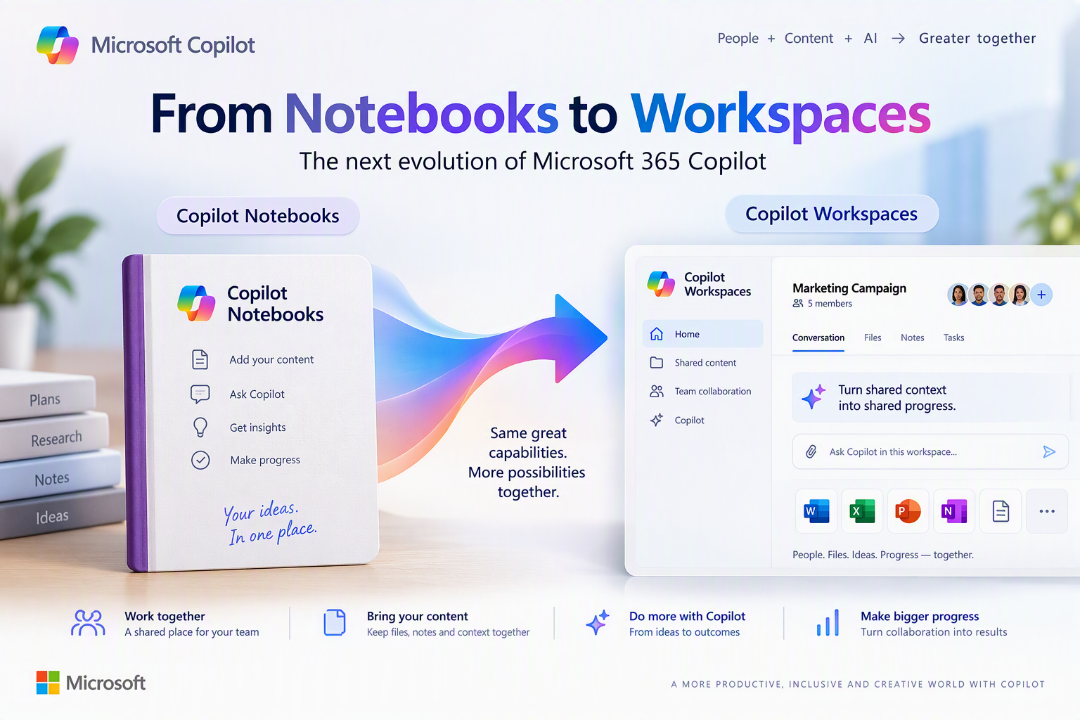
Copilot Notebooks is becoming Copilot Workspaces.
You might be thinking “oh look, another Microsoft product rename“, but when we look at little bit deeper into what Microsoft is actually doing here – there is much more to it.
The change signals a move from using Copilot simply to work with a curated collection of information towards creating a shared, collaborative workspace where people and Copilot work together around an ongoing piece of work.
And that makes the new name considerably more appropriate.
What are Copilot Workspaces?
Copilot Workspaces are the new name for Copilot Notebooks. A Copilot Workspace is a shared place where a team can keep project information and files together and work with Copilot around an ongoing workstream.

That builds on the idea behind Copilot Notebooks but synergises (is that a word) the approach and naming that Microsoft uses across other Copilot areas such as Cowork.
- Copilot Notebooks provided a way of bringing relevant information together so that Copilot could reason over a more focused set of context.
- Copilot Workspaces takes that concept further.
Microsoft describes the new Workspace experience as “team-first”, with collaboration across different documents, visibility of what other people are working on through live cursors, and the ability for teams to work with Copilot using their shared context. It is also a much better way to work in Copilot and unify the experiences.
This is an important distinction.
This isn’t simply somewhere to collect information for Copilot – it becomes front and centre within Copilot and within each Copilot Experience.
So, what’s changing?
The biggest shift is collaboration.
Microsoft’s support documentation says that within a Copilot Workspace, teams will be able to:
- share the same files and pages
- see who else is in the Workspace and what they’re working on
- collaborate around the same workstream
- use Copilot against that shared working context.
As you start to play with Workspaces (especially if you are new to them) they feel much more like a persistent working environment rather than simply a container for grounding information.
Microsoft says these latest collaborative experiences will be available within the Microsoft Copilot app, with the experiences rolling out to Copilot Workspaces in OneNote over time.
What happens to my existing Copilot Notebooks?
In short nothing! 😉 – there is not migration exercise for users or IT and existing Copilot Notebooks will automatically become Copilot Workspaces.
Everything already added or created remains there, and existing sharing arrangements continue. If a Notebook wasn’t previously shared, the resulting Workspace remains private.
Microsoft also explicitly states that no existing Copilot Notebook features will be removed as part of the change.
What about Copilot Projects?
Here’s another interesting distinction. Oh yes – those!
Microsoft now positions Projects and Workspaces as two different ways of organising work.
- Copilot Projects are for individual work. Microsoft says a Project brings your chats, tasks, files and results together and can be used with Chat and Cowork.
- Copilot Workspaces are for group work. They provide a shared environment where a team can work with Copilot around a workstream.
Microsoft also says that, as the changes roll out, content from a Project can be brought into a Workspace when you want to share it with a team.
Projects : my individual work with Copilot.
Workspaces: Group work with Copilot.
When is this happening?
Copilot Workspaces began a phased rollout at the end of October 2026, with availability dependent on an organisation’s rollout schedule.
For organisations using Microsoft 365, Microsoft recommends that IT administrators check Message Center for their specific rollout details. No immediate administrator action is required simply to retain existing Notebook content. 2
Why Workspaces makes much more sense
Personally, I think Workspaces is a much better description of where Microsoft is taking this capability and to be honest people got a bit confused between OneNote Notebooks and Copilot Notebooks, especially because you can open Copilot Notebooks from within OneNote!
“Notebook” naturally sounds like somewhere you collect and organise information.
“Workspace” implies something much broader.
The more interesting part isn’t really the rename – It’s Microsoft’s move towards making Copilot an active participant inside the shared context where teams are already getting work done.
Rather than continually giving Copilot the background to a piece of work, the Workspace can increasingly become that persistent context.
That’s potentially a much bigger shift.
Copilot Notebooks to Workspaces Transition Timeline
- Rollout started in phases from late October 2026.
- Existing Notebooks automatically become Workspaces.
- Existing content remains available.
- Existing sharing continues.
- Existing Notebook capabilities remain available.
- Organisation-specific rollout information is available through Microsoft 365 Message Center.
Further reading
Microsoft – Copilot Notebooks is now Copilot Workspaces
My final Thoughts….
Copilot Notebooks was already one of the more interesting ways of grounding Copilot around a specific topic, project or collection of information.
Workspaces takes the idea in a more collaborative direction.
The underlying concept is straightforward:
Bring people, information and Copilot together around the work rather than making everyone repeatedly bring the work to Copilot.
The rename from Notebooks to Workspaces may seem small, but the thinking behind the change gives us another indication of where Microsoft’s Copilot experience is heading.
From an assistant you interact with.
To a collaborator that increasingly sits inside the work itself.
Leave a Reply