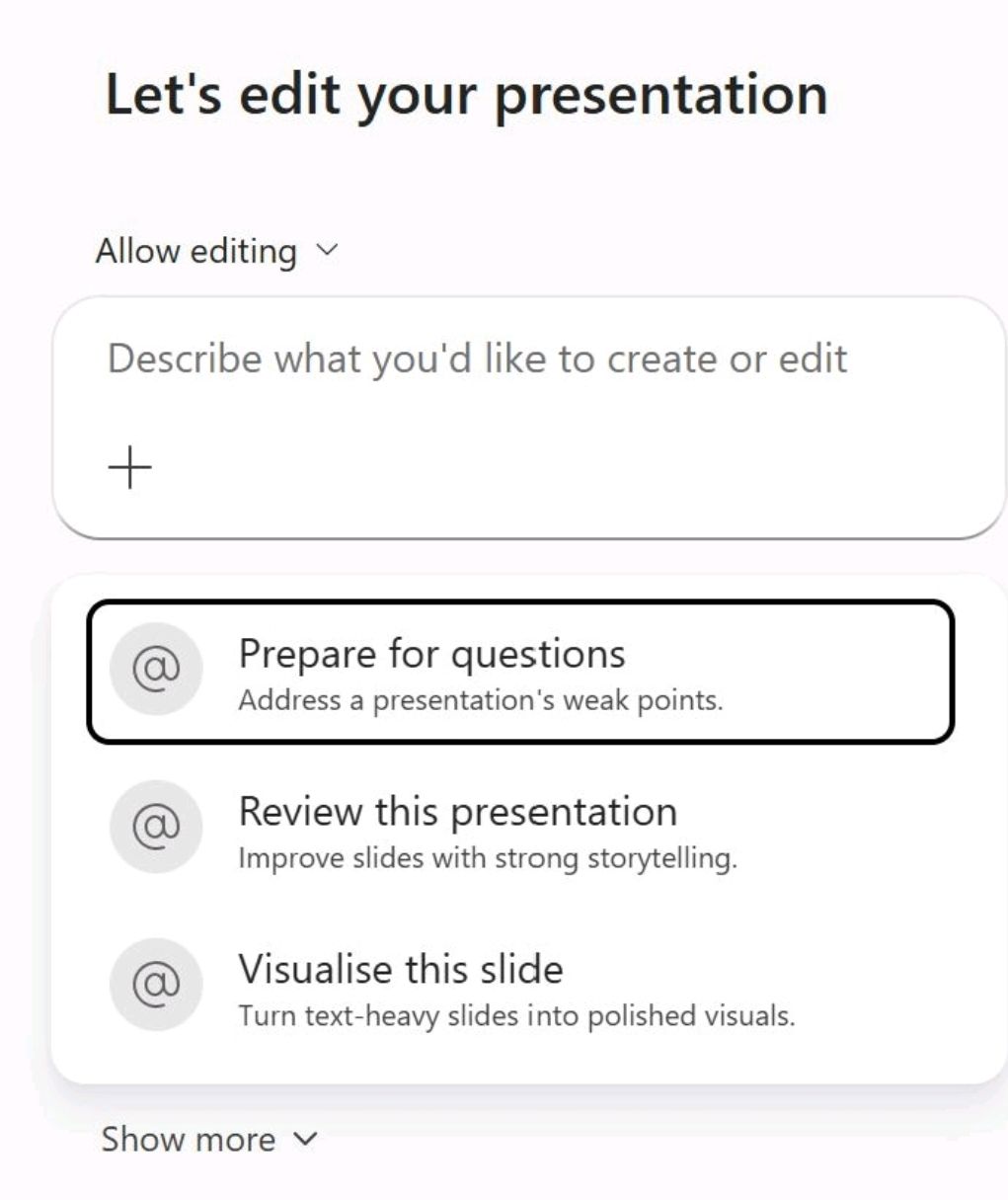

Microsoft is introducing a new AI‑assisted editing experience in PowerPoint that amongst other things can help you Prep for your Presso.
This is part of the “Edit with” experience as a proactive way to actively help people edit, modify and now prep for presentations. Instead of
navigating menus or manually tweaking layouts, you can now describe what you want to adjust, improve, or rethink – and Copilot handles the operational details, suggestions and more.

What edit with offers
The new updates (proactive stuff) includes new proactive suggestions in addition to the standard edit with / Vibe working.
PowerPoint now is starting to offer focused actions such as:
- Prepare for questions — Strengthens weak points and anticipates areas where an audience may challenge you
- Review this presentation — Improves clarity, flow, and narrative structure
- Visualise this slide — ideal for converts noisy, crowded and dense text into more digestible visual formats
These options reflect real tasks people struggle with – not just formatting, but communication.
Why I like this.
Most users don’t start with a list of formatting commands. They start with a feeling: “This slide is too busy,” or “This section doesn’t work for me,” or “I need this to feel more confident”, or “what questions might I be asked by a my client”.
This mode of working doesn’t just suggest it
- It interprets intent, not just commands
You don’t need to specify the exact edits. You can describe the outcome you want, and the AI makes the structural decisions needed to get there. That’s the essence of vibe‑driven AI: translating a qualitative direction into concrete changes. - It closes the gap between expertise and execution – People often know what they want a slide to communicate, but not the best way to express it visually or narratively. This feature bridges that gap without forcing users to become layout experts.
- It supports the thinking process, not just the formatting process. Good presentations come from clarity of thought. By handling the doing, pulling together and formatting of the slides Copilot lets you to focus on the message, the story, and the argument you’re trying to make and it takes care (or at least a good draft) of the rest.
- It improves the presenter, not just the deck – The “prepare for questions” option is a good example. It doesn’t just polish slides – it strengthens your understanding of your own content. That’s a subtle but important shift.
The next step of AI supported working
This feature reflects a broader trend where AI tools like Copilot are moving away from command‑driven, text only interactions and toward intent‑driven collaboration. Instead of telling software how to do something, you describe what you’re trying to achieve.
For PowerPoint, that means presentations become less about wrestling with formatting and more about refining ideas. For AI more broadly, it shows how tools can adapt to human thinking patterns instead of the other way around.
What do you think?
Leave a Reply