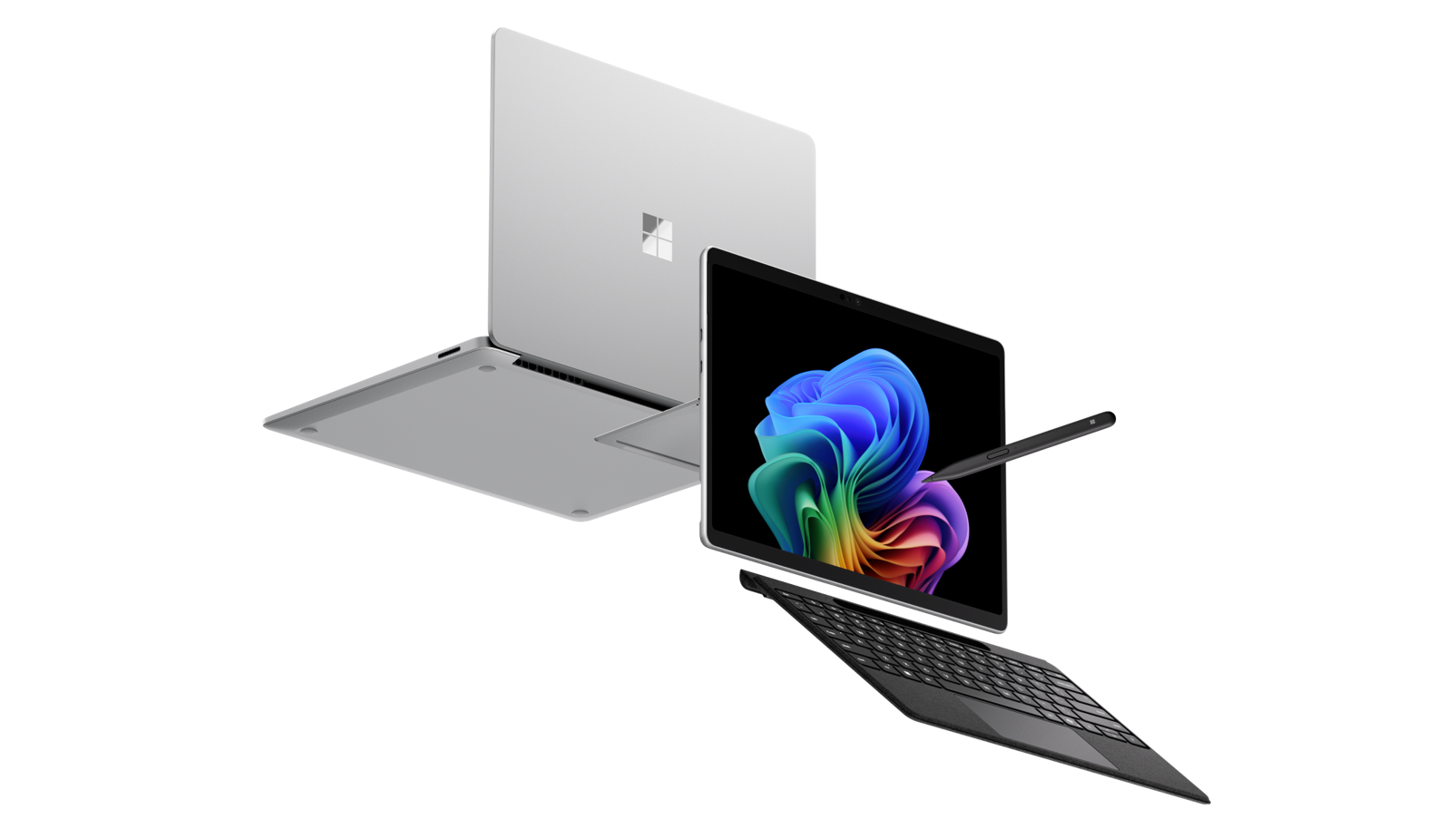

Microsoft has unveiled the Surface Pro 12 and Surface Laptop 8. These are targeted at commercial / business users and whilst form factors stick with the current design, they pack new upgrade features including like built in privacy screens (which are app based), improved displays, and haptic trackpads across both ranges.
These devices come at a time where chip and memory prices are at an all time higher meaning these devices start at premium pricing, but on par with other premium devices. As usual Microsoft position these against other leading brands with Microsoft of course the “Apple of the Enterprise” space owning the entire ecosystem from Chip to Cloud.
Surface: Premium Spec and Premium Price
Surface Pro 12 and Surface Laptop 8 launch with a clear focus on commercial and enterprise users rather than consumers. Both devices start at $1,949.99.
Both these revised versions bring strong chipsets upgrades, enhanced durability, improved security, and productivity rather than focusing on consumer entertainment features though I expect new consumer devices will not be far behind.
Surface Pro 12
Surface Pro 12 offers configurations with Intel Core Ultra Series 3 processors and up to 64GB RAM, 1TB storage, and optional OLED displays. Surface Pro also has optional 5G connectivity on select models.

There is also Wi-Fi 7 and Bluetooth 5.4 for faster, more reliable connectivity.
Surface Pro keyboards also support adaptive touch mode, an accessibility setting that lets users use other body parts for the touchpad
Surface Pro also features the “The Surface Pro Flex Keyboard” which can be used attached or detached. It charges when attached and has >40 hours of continuous typing and up to 32 feet of connectivity when used attached. The Kensington Surface Elevate Stand makes a perfect accessory!
Surface Laptop 8
Surface Laptop 8 comes in 13.8-inch and 15-inch versions, powered by Intel Core Ultra Series 3 processors, high-resolution cameras (1440p front, 4K rear) for hybrid work environments and optional built in privacy screens and 5G capability. As you would expect, there is Wi-Fi 7 and Bluetooth 5.4 for faster, more reliable connectivity.

Supported on both 13.8 and 15-inch models, adaptive touch mode is an accessibility setting that lets users use other body parts for the touchpad.
Note: Optional 5G is available on 13.8" Surface Laptop only at the current time. Surface Chipsets Options
The initial rollout prioritises Intel Core Ultra Series 3 chips, marking a shift from Microsoft’s previous Arm-first strategy. Microsoft remain fully committed to Qualcomm’s Snapdragon X2 models which are expected to be announced later this year, continuing the choice between Intel x86 and Arm based architectures.
This staggered release reflects Microsoft’s intent to secure business adoption first, while consumer-focused versions will follow.
Why Surface?
I might be a little biased as I been a fan of Surface since day 1 (2012). The goal of Surface has always been to represent and innovate the best experience of Windows ever.
Surface is part of the Windows and Devices business unit at Microsoft – meaning influence, control and design from Chip-to-Cloud. It has brought us innovations we now consider standard such as Windows Hello for Business and the 2-in-1 form factor as well as ink and pen.
For me (as both a consumer user and business exec user of Surface), Surface and Windows have always been about 4 things.
- Human-centered: Surface provides us natural ways to work that improve focus, flow, and collaboration. Key things for me are ink, pen and touch. I use a Pro (with 5G) and flex keyboard to work anywhere, in different styles and as I need.
- Strong foundation for modern security: Microsoft owns controls and protects the stack across Chip to Cloud with protection across hardware, device firmware/UEFI, Windows, and Cloud.
- Simple and Unified Management – From Windows Autopilot Zero Touch deployment, fleet visibility and management (through the Surface Management Portal built directly into Intune) and Firmware management through Windows Update and AutoPatch – this really helps IT team from 10s to 10,000s of devices.
- Leading AI-ready devices by design – Naturally this is about supporting both cloud-based and on-device AI acceleration as all Surface devices are now Copilot+ PCs with dedicated AI NPUs to power AI-based workloads locally. For me, any organisations serious at AI transformation needs to look at AI/Copilot+ PCs as the device (edge device) puts people at the center of an accelerated AI transformation

On a Surface Copilot+ PC, M365 Copilot connects (and will connect deeper) with Windows 11 for faster, more fluid productivity. AI Voice response with lower latency and select features like rewrite in Outlook work offline.
Windows agentic workspace provides a secure execution environment where agents run with system context. The Agent Workspace isolates activity, connects to enterprise systems, then hands back the results.
Users can also run advanced agent workloads locally for speed, privacy, and resilience. This local execution leverages on-device NPUs for fast performance, enabling agents to process tasks without sending data to the cloud.
The Microsoft Copilot+ PC Advantage
The pricing strategy places Surface Pro 12 and Laptop 8 against their strongest rivals in the enterprise market, including Lenovo’s ThinkPad line and HP’s Elite series.
The addition of removable SSDs, industry leading repairability, sustainable design and plus continued support for Surface Connect ports reinforces compatibility with existing corporate device deployments. This should help strengthening Microsoft’s case for long-term adoption. USB/thunderbolt charging continues to be supported for maximal compatibility and helps businesses shift more seamlessly from other OEMs to Surface too.
Secure Core
What is more, Surface and Windows engineering teams have worked closely to bring “the best AI features of Windows 11” to Surface enhancing user productivity and introducing new ways to improve a user’s everyday work. And because Surface is designed by Microsoft, it does not simply adopt Windows security innovation “after the fact”, it helps lead, test and prove what best practice can look like out of box across device, OS, firmware, cloud identity and management without the need for bloat-ware, add-ons or third party apps.
Through the Open Device Partnership (ODP), Surface is also a leading contributor to shared security practices across hardware, firmware and software – this includes work on the foundational components that sit beneath the OS, like the embedded controller, UEFI boot firmware and Windows drivers. The important point is that these areas are being modernized using memory-safe approaches like Rust, reducing whole classes of vulnerability and helping make low-level device behavior more secure, consistent and reliable.
AI First and AI Leading
Then we have the fact there are 40+ local AI models (SLMs) built directly into Windows 11 that unlock new existing and future capabilities. The six exclusive features Microsoft typically talk about are:
- Windows Recall: Enabling users to just describe what they are looking for or use visual search, and Recall will show you “secured” snapshots of the most relevant content in a way that feels like having photographic memory.
- Windows Studio Effects: These provide huge local AI processing for enhanced video and voice so you can put your best self forward in videocalls with features like flattering portrait lighting, creative filters and natural-looking eye contact, while enhanced noise canceling, and background blur shut out distraction.
- Click to Do: Similar to Circle to Do on Android Phones, but you can use Click to Do to get more done from any screen – there are actions like converting tables to Excel and sending selected text directly to Copilot to boost productivity and creativity. Click to Do recognizes text, and images on your screen. It offers AI powered actions you can take on these, saving you time by helping complete tasks inline.
- Live Captions: help empower employees and serve customers anywhere, Live Captions can translate more than 40 languages into English, including speakers in real-time videocalls, recordings and streamed content all in real-time running on device.
- AI Windows Search: This is about helping users finding the right files, including documents, settings or photos. You can use natural language in File Explorer or Windows Search to find files and photo content locally and on OneDrive with no need to remember file names, settings locations etc.
- Agents in settings: Conversational personalisation of your Copilot+ PC for doing tasks such as “Connect my headset” or “Change my desktop wallpaper” to jump tot the right place in Settings app.
Copilot+ PCs also include existing Windows AI capabilities such as:
- Teams Super resolution which provides improved video quality in low-bandwidth calls – this helps in “blocky call moments” by using AI to enhance what you see.
- Generative fill and erase in Paint – Generative fill in Paint allows you to easily make edits and additions with just a few words, while maintaining the existing art style without using complex software. After selecting part of your image with the selection tool, enter a prompt to add or modify the image with AI-generated elements.
- Super resolution in Photos App – Super resolution in the Photos app enables users to upscale and sharpen their photos up to 8x the original image size, restoring low-quality photos quickly and efficiently. This is great for improving old or low-quality photos, preparing photos for large prints or displays, and tight cropping to zero into the content you want to focus on.
- Paint Cocreator – Combine your ink strokes with text prompts to generate new images in nearly real time with Cocreator. As you iterate and draw, so does the artwork, helping you more easily refine, edit and evolve your ideas using powerful diffusion-based algorithms running locally on the NPU.
Sustainable Design
The sustainability approach for Surface starts with how their devices are designed, built, and how components are sourced. Microsoft adopt circular design principles that support reuse, repair and longevity.
This continues through how their devices are transported, with more thoughtful packaging designed to reduce plastic use and use paper-based materials from responsibly managed sources.
All this I in my view, justifies the premium pricing of Surface by addressing security, usability, AI native features and collaboration challenges in modern workplaces.
Leave a Reply